|
|
马上注册,结识高手,享用更多资源,轻松玩转三维网社区。
您需要 登录 才可以下载或查看,没有帐号?注册

x
本帖最后由 xiayongjun 于 2010-5-30 01:14 编辑
, z7 W+ t; r; `' n! e u7 v: t; b n7 o' b: t# e4 z
插件论坛里有的下:http://www.3dportal.cn/discuz/viewthread.php?tid=629048&highlight=mathcad- B5 H, o1 M8 q3 c" q8 t! A
里面有个英文的安装教程 ^/ q9 I: F5 I" `# n
y- D/ g0 K+ N& {9 `$ X; `' Z7 Q t. o
How to install
8 I( |; H M. a( @4 r
/ D# u7 I, o% G& i& t1.) Register the Mathcad DLL using the regasm utility. 9 e1 j/ B/ C3 U$ R0 Q
$ W+ t6 y; E; R% v. o$ d" ]
1、Open a command window.
# N" h- @5 j0 |/ B2、Change the directory to your Microsoft.Net Framework version directory C:\windows\microsoft.net\framework\v1.1.4322 ( U! P: J% V( |, _: c3 w
3、At the command prompt, type the following command: 8 f- B& E2 M$ k
# E: @; q1 n& G5 N0 j# b
regasm C:\mathcad\mathcad_14.dll /codebase
/ c- A* ~% u2 o3 }
9 u/ P7 O3 z7 P: g& Swhere c:\mathcad\mathcad_14.dll represents the directory where your mathcad_14.dll file is located. 5 o' i4 c7 U+ K& Z6 n% B1 Z
我把过程和我遇到的问题和各位分享一下(Mathcad 14和SolidWorks 2009):: _3 r5 O% k" l% F4 @
1、开始——运行——cmd——cd C:\windows\microsoft.net\framework\v1.1.4322(改变当前目录)) v) k) U ^6 E$ ]2 p
2、regasm c:\mathcad\mathcad_14.dll /codebase# X, {' J" {8 o7 G) V. I- e
5 r- _3 u. l& D+ g4 ~
第二步要注意一下,文中说的regasm.exe不一定在C:\windows\microsoft.net\framework\v1.1.4322目录下的,我的就是在另一个文件夹(v2.0.50727),会出现该命令不是内部命令之类的提示!可以先搜索找到regasm.exe复制到v1.1.4322目录下,或者在第一步的时候直接将当前目录改到regasm所在位置。第二步的路径是Mathcad_14.dll所在目录,运行过了就OK了。
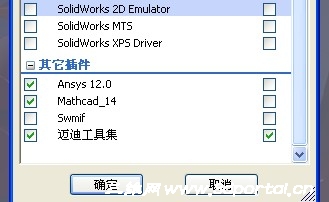
& q T. [6 O; U$ D/ D6 W# [最后运行SolidWorks,插件下面就会有Mathcad的选项! |
-
|







 发表于 2010-5-30 01:11:48