|
|

楼主 |
发表于 2016-12-17 16:35:38
|
显示全部楼层
来自: 中国天津
- Sub 打开文件()
" G: _' }6 S8 s) s7 ~4 q! ? - Range("A3").Activate' ?# F' b+ f4 ~# ~7 M
- Set swApp = CreateObject("SldWorks.Application") '启动SW
/ p7 h3 J7 k5 [% K; T% u0 e - Dim intChoice As Integer
( P% u! _ d7 N3 g# l - Dim FilePathName As String; B4 I1 R9 ?" s o+ u. x
- Dim i As Integer2 [9 P' g% }0 [* ^$ X, F4 `1 A/ i
- HeaderRow = 20 {0 q; ?' h3 \6 v" B6 K
- RowNumber = 3
& Y7 u* A5 _, V0 {& _% G; }% Z - PathName = Cells(RowNumber, 1) '讀取第一個路徑的值
8 V7 G1 I5 C2 n; v) F: | - While Not (PathName = "" Or PathName = 0 Or IsEmpty(PathName)) '直到讀完路徑欄(尋找繼續填寫的位置)$ X, ? H7 s O) j s2 E8 f
- RowNumber = RowNumber + 1 '下一列
- P' m) m! C# o2 j$ o( y - PathName = Cells(RowNumber, 1)
- t) i+ ?$ g0 E) M3 n3 p1 [. o - Wend '回到>直到讀完路徑欄
: G2 I* r7 D" k7 d" \- \ - Application.FileDialog(msoFileDialogFilePicker).AllowMultiSelect = True '設定為多選對話框( K: L c- d$ A: B5 h) ^0 E
- Application.FileDialog(msoFileDialogFilePicker).Filters.Clear '清除既有類型
1 l5 V4 a+ P: S1 @; d$ G( n - Application.FileDialog(msoFileDialogFilePicker).Filters.Add "零件自定义属性", "*.SLDPRT" '設定檔案類型, B" [+ }0 G9 D% j; |
- Application.FileDialog(msoFileDialogFilePicker).Filters.Add "零件配置属性", "*.SLDPRT" '設定檔案類型0 R: b1 V6 {) f) }! Y9 H/ E
- Application.FileDialog(msoFileDialogFilePicker).Filters.Add "装配体自定义属性", "*.SLDASM" '設定檔案類型# b3 K( a# [5 ]0 b `
- Application.FileDialog(msoFileDialogFilePicker).Filters.Add "装配体配置属性", "*.SLDASM" '設定檔案類型$ N9 b% X& K7 y J, t0 v9 R$ W
- Application.FileDialog(msoFileDialogFilePicker).Filters.Add "工程图属性", "*.SLDDRW" '設定檔案類型
. T J+ f$ @" t0 _4 c. l4 B - If Cells(1, 1) = 1 Or Cells(1, 1) = 2 Or Cells(1, 1) = 3 Or Cells(1, 1) = 4 Or Cells(1, 1) = 5 Then
% A; D$ m" f' [" Q' x* e - Application.FileDialog(msoFileDialogFilePicker).FilterIndex = Cells(1, 1)
. @. L. K' z) D$ m8 K - End If1 z1 I" c& M& c: {5 u' P7 q9 O
- If Cells(1, 2) <> "" Then Application.FileDialog(msoFileDialogFilePicker).InitialFileName = Cells(1, 2)
5 `6 @6 P0 y- R; d& K4 w, g# j+ Z - intChoice = Application.FileDialog(msoFileDialogFilePicker).Show '彈出對話框
. V1 D& R* L1 C8 O* d: U - $ d$ V. M F) p# [+ k# @
- If intChoice <> 0 Then '判斷有否點選檔案
; T6 }$ l$ L; { - RowCount = 10 e9 e4 q. M$ u d/ o6 X
- swFilterIndex = Application.FileDialog(msoFileDialogFilePicker).FilterIndex. s2 C+ s: S, l- j0 H
- For i = 1 To Application.FileDialog(msoFileDialogFilePicker).SelectedItems.Count '逐一讀取所選檔案
& n/ d$ x2 d1 L- U. q - FilePathName = Application.FileDialog(msoFileDialogFilePicker).SelectedItems(i) '讀取完整檔案名稱
/ w3 a5 K/ H5 [/ p) b8 T6 q - FilePath = Left(FilePathName, InStrRev(FilePathName, "")) '分解路徑
( f7 q# R$ G7 y5 F - FileName = Right(FilePathName, Len(FilePathName) - Len(FilePath)) '分解檔案名稱5 X3 U7 r, a" V- L" |0 D) H
- FileExtname = UCase(Right(FilePathName, 6)) '分解檔案類型- S0 S" S0 A: {* S* _& Y" y
- If swFilterIndex = 1 Or swFilterIndex = 3 Or swFilterIndex = 5 Then
) S8 K7 O( l2 h6 P - Cells(RowCount + RowNumber - 1, 1) = FilePath '填寫路徑
( x" G* J2 M0 H0 [ j# K - Cells(RowCount + RowNumber - 1, 2) = FileName '填寫檔案名稱
& w3 ^) E8 G& n' v - RowCount = RowCount + 1
% z# O2 E8 r6 m - End If: [, \2 P0 B& a( ?
- If swFilterIndex = 2 Or swFilterIndex = 4 Then '過濾器是2或42 G- g9 B2 e& l
- swConfigNames = swApp.GetConfigurationNames(FilePathName): I6 d3 Y0 Y$ R, O' ]( o8 _) {) j
- ConfigColor = 200! S" q0 K0 ^4 w5 n, B! a o8 @$ U
- For Each swConfigName In swConfigNames
2 P$ S6 i( M: s5 p% {1 N7 T/ r( D* G - Cells(RowCount + RowNumber - 1, 1) = FilePath '填寫路徑9 ^2 {; O7 n1 l. t
- Cells(RowCount + RowNumber - 1, 2) = FileName '填寫檔案名稱' B3 D& Q) V: J r0 w3 i; w; ~2 f
- Cells(RowCount + RowNumber - 1, 3).NumberFormatLocal = "@" '设为“文本”格式, l9 T8 ^. \% \0 Z s T
- Cells(RowCount + RowNumber - 1, 3) = swConfigName '填寫模型組態名稱0 V4 ~: j/ T% q3 o+ V* P+ o6 |% m
- Cells(RowCount + RowNumber - 1, 3).Errors.Item(xlNumberAsText).Ignore = True '去除三角错误 q. X9 I' ]& h3 W! o
- Cells(RowCount + RowNumber - 1, 3).Interior.Color = RGB(ConfigColor, ConfigColor, ConfigColor)' @1 E* {" [- d
1 S- R+ C. R, V( s b- n" t- RowCount = RowCount + 1; L; _& O/ i+ \ B1 z2 F1 ?5 V
- Next3 G% t& A0 v' Q; ?# I3 F
- End If '排除無效檔案<完>. A) _# c' A# T( [/ c' g+ N
- Next i '逐一讀取所選檔案<完>% B4 n( F4 n" T3 T& u# Y1 O
- End If '判斷有否點選檔案<完>
0 N, i+ Z: `" V5 Z - End Sub8 o7 a# W t# \9 K5 d1 O3 G
- I3 G* U! z, U" f. R( |6 ~$ \- Sub 读取配置特性属性名称() `! D! `+ @7 H% c$ q4 Z% N
- 'Set objClassfac = CreateObject("SwDocumentMgr.SwDMClassFactory")
* T7 Q' N/ [; H q - 'Set swDM = objClassfac.GetApplication(SWDMLicenseKey) '啟動SWDM y& {+ R- A# e- M5 {
- 'Dim swCfg As SwDMConfiguration '14$ V6 y9 I: ?# t, [
- Range("A3").Activate6 N7 E4 d8 b7 c
- Set swApp = CreateObject("SldWorks.Application") '啟動SW; w) H) y$ K/ w
- Dim PropList() As String5 C R, @" a/ `; \, x0 a Y W
- ReDim PropList(0)
$ T4 X8 o9 \4 M S- w& a - PropList(0) = ""
- \$ Q0 H+ I N" K+ X - Dim intChoice As Integer
& }: F$ R. V' o5 f4 A5 C0 l0 q - Dim FilePathName As String0 a* @! J2 u# Q6 e* H
- Dim i As Integer7 r; s3 A/ l0 w$ e
- HeaderRow = 2
$ G3 }' Q# `; ^& h) r& _ - RowNumber = 3
% N4 Z1 `/ c( _6 K _ - PathName = Cells(RowNumber, 1) '讀取第一個路徑的值
$ \ R. M |* H5 ] - While Not (PathName = "" Or PathName = 0 Or IsEmpty(PathName)) '直到讀完路徑欄- K; `" H* T* {9 G$ n. R* {
- FileName = Trim(Cells(RowNumber, 2))
, f. \/ J! O. T5 E2 p$ T8 O3 m/ v4 x - FileExtname = UCase(Right(Cells(RowNumber, 2), 6))+ R9 H$ O! S! @7 P R3 A' O
- If "SLDPRT" = FileExtname Then swFileTYpe = 1
; \+ {& b8 Q( x+ A- o* v2 w& ^% ` - If "SLDASM" = FileExtname Then swFileTYpe = 2
" F" l6 f& r2 u% o( \6 d. G - If "SLDDRW" = FileExtname Then swFileTYpe = 3
. @& M, D. G1 J8 h+ m - ' Set swDoc = swDM.GetDocument(PathName & FileName, swFileTYpe, False, mOpenErrors) '開啟- l7 @+ s5 G' x
- Set swDoc = swApp.OpenDoc(PathName & FileName, swFileTYpe) '開啟檔案
6 v9 v- [2 z8 E* m9 c- ^: P - If Not swDoc Is Nothing Then '排除無效檔案
% g% Z* u1 p# c# Y! \# a - swConfigName = Cells(RowNumber, 3)1 a! A) y9 K0 j) }) d
- If swConfigName = "" Or swConfigName = 0 Then5 ]/ @" s/ G* S6 T
- vCustPropNameArr = swDoc.GetCustomPropertyNames* V8 v+ i7 b L/ C, J) ~
- If TypeName(vCustPropNameArr) = "String()" Then( n1 M" y4 @( C* i5 S" J/ Y
- For Each vCustPropName In vCustPropNameArr
& {) E" K, g2 U* s; u" x! V5 e - InList = False
7 D4 V0 B- ?9 a - For Each PropItem In PropList8 o3 F0 D( u$ k' k
- If vCustPropName = PropItem Then InList = True
( a2 r4 Q4 h# \ - Next. q' t8 P7 a, A3 X! i5 t
- If Not InList Then; E# S& ~/ x# j2 ~0 b
- ReDim Preserve PropList(UBound(PropList) + 1)8 R. R8 F9 g: o) e' M5 _
- PropList(UBound(PropList)) = vCustPropName: b0 q# o/ B' c' s* b' p
- End If
) }8 B% p/ j- ]4 P2 ~ u% W8 u - Next
9 b4 @: o$ O+ n, e) C - End If
# t. ]7 [( ?. _% K# N, [' H) N - Else' p0 X0 O0 y5 q* R, X" q# }+ ]0 i
- ' Set swCfgMgr = swDoc.ConfigurationManager
! B6 \2 ]1 ]8 {* P - ' swConfigNames = swCfgMgr.GetConfigurationNames% v4 m& e, u/ i8 }9 U* t7 Z
- swConfigNames = swApp.GetConfigurationNames(PathName & FileName). P) u: \1 J- {9 I' e
- For Each swConfigName In swConfigNames! E' ?+ W$ ?$ R8 j" l9 w7 e3 N
-
u7 c( g& M' G. m4 L - ' Set swCfg = swCfgMgr.GetConfigurationByName(swConfigName)
$ q1 {2 y% P# {) i - ' vCustPropNameArr = swCfg.GetCustomPropertyNames
3 K3 Q9 m$ Y0 j - 6 v1 l+ {" T3 J9 N2 h1 O4 K, n/ t' B
: |, u' e( H+ Q- ' Set swmodel = swApp.ActiveDoc
% h* @! N9 D/ J$ U& T - ' Set swCfg = swDoc.GetConfigurationByName(swConfigName)
! O3 o% k9 L+ J$ B# q# [8 h; u - vCustPropNameArr = swDoc.GetConfigurationNames
- g" T3 S. o; S -
" j7 x2 R4 X( z - If TypeName(vCustPropNameArr) = "String()" Then1 n9 e3 f1 M; W, K
- For Each vCustPropName In vCustPropNameArr
8 n( W6 l4 `5 O. I - InList = False" M/ ^" Y4 {. ~3 L/ Z" C
- For Each PropItem In PropList5 E8 }) D, w/ y1 g& k7 i
- If vCustPropName = PropItem Then InList = True. ~2 w8 N; N" ^/ i
- Next
: g) M+ l9 ]# k - If Not InList Then
# v8 e. ?# l, B! K - ReDim Preserve PropList(UBound(PropList) + 1)
/ i: C6 O" i9 y0 ~/ { - PropList(UBound(PropList)) = vCustPropName
( ]/ r1 q- [ J0 e; R - End If
' d( [; B, D6 c! y) m& g( C8 x, O - Next
3 B+ f& f4 d4 A0 D _ - End If; X( \' N0 {3 G% Q8 l* L9 v
- Next9 ?. R2 Q5 `8 P1 C
- End If 'If swConfigName = "" Or swConfigName = 0 swDoc.CloseDoc '關閉檔案
, Q3 r9 b7 a8 P - Cells(RowNumber, 1).Interior.Color = RGB(200, 200, 255)
/ {; e |% S7 ]6 } T - End If ''If Not swDoc Is Nothing' s9 P3 K2 j( S$ ]' L
- RowNumber = RowNumber + 1 '下一列
" i( a% l, b4 R+ I, k& H; U - PathName = Cells(RowNumber, 1)
! X, J% F! P8 I6 z - Wend '回到>直到讀完路徑欄
. F$ g7 e3 F. p/ a+ u% x - PropHeading = 4
- j- U0 k" K% N) S e$ u! Z - For i = 1 To UBound(PropList) '- 1) W' w8 J0 m7 n5 }! C
- Cells(HeaderRow, PropHeading) = PropList(i)
* I# O" T( G2 ?$ ?0 W - Cells(HeaderRow, PropHeading).Font.Bold = True$ Z! N& H- q( B; W& t1 _, _
- PropHeading = PropHeading + 1
2 {$ e. l1 Q) M& v - Next
|
|








 发表于 2016-12-17 16:33:44
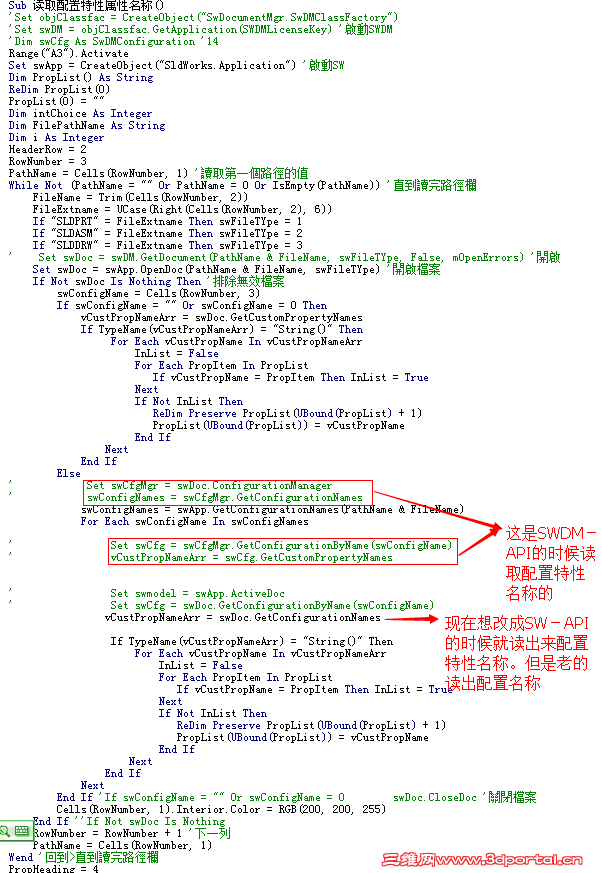
 丹大现在不用SWDM就可以了啊。呵呵