|
|
 发表于 2010-1-23 12:34:45
|
显示全部楼层
发表于 2010-1-23 12:34:45
|
显示全部楼层
来自: 中国浙江宁波
本帖最后由 sealive_leafage 于 2010-1-23 12:37 编辑
% i5 [# m+ [" y% O: N5 } e9 d ]1 s% |
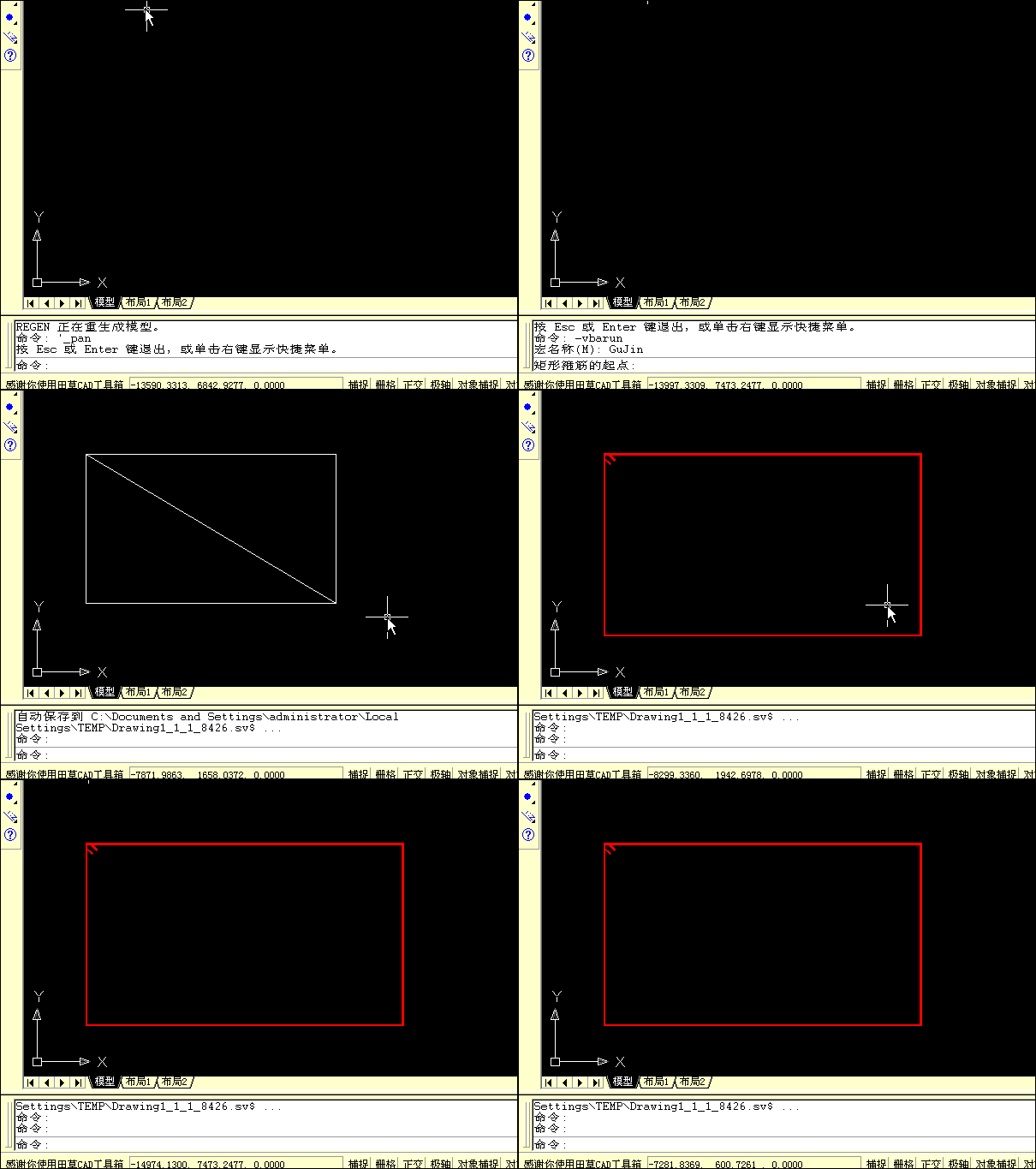
问题的难点在于在CAD中如何动态实时获得鼠标点的坐标,网上收集了些资料楼主可以体会一下;获得坐标值后则可以实现楼主要求的效果;详细参考:http://tiancao.net/blogview.asp?logID=2143 j0 L' K' c2 D* Z+ k3 K9 N
CAD VBA实现橡皮筋直线、圆- X( i$ _: E6 D( n
3 |7 R8 A+ J l! G& O8 _# ]
首先是计时控件,然后是实时捕捉鼠标的屏幕位置,然后是转换获得CAD当前试图鼠标所在的位置坐标,然后才是实时绘制直线或圆。
, j3 E! M7 }0 |2 c1 }, nVBA中不可直接使用vb的timer控件,我们可以调用独立的xTimer控件。
X6 t" Y- V$ l$ Y/ M$ B控件下载: / q" I7 O3 T8 S8 V \& `1 ^+ `
http://www.tiancao.net/flashget.asp?dizhi=http://www.tiancao.net/attachments/month_0707/qnft_XTimers.rar# A) w6 c+ Y8 A- [
, |" w/ k8 K" T% A3 Q) e1 }' n0 ?
然后是使用API函数GetCursorPos获得当前鼠标的屏幕坐标。6 g0 D0 f: z3 i _, a1 J& ~# K
然后通过读取CAD系统变量viewSize荷Screensize分别得到当前试图的CAD高度和当前视口的屏幕尺寸(屏幕分辨率的像素).然后得到CAD实际尺寸和屏幕像素的比值。2 ?! @5 b, O9 Y. C1 Q, B' \
精确度于鼠标的频率快慢有关系
. {2 j5 ~2 b9 B' ?, ]! Y8 Y. Z. q# Z. w3 x5 @
'获取CAD坐标系统和屏幕像素的比值0 P- M" h" Q; T }
Function ViewScreen() As Double
( h% G7 l" W2 I' z. U Dim ScreenSize As Variant
6 { k3 B$ v4 N+ g, f+ { ScreenSize = ThisDrawing.GetVariable("screensize") '当前视口的屏幕宽度和高度
5 j6 N: A! H$ b' y) w1 A Dim H As Variant" T* Z! u' g7 N9 M9 \* V
H = ThisDrawing.GetVariable("viewsize") '当前视图图形的实际高度( [+ B. @) @. R4 p
ViewScreen = Abs(H / ScreenSize(1))
" b9 Q; Z _# W; r T4 T! m% nEnd Function
$ ~7 k' L% g. ZPublic Declare Function GetCursorPos Lib "user32" (lpPoint As POINTAPI) As Long
8 l9 G: p* _, u+ X
B% S* z' K+ K* A! R6 Y7 w实时获得鼠标的屏幕坐标,然后通过屏幕尺寸和cad实际尺寸的比值,计算出鼠标当前的cad坐标。
$ Z3 A- h# z [$ X% d( S8 u然后在基点和鼠标坐标之间绘制直线或圆。
9 @2 c& H# o5 X6 p' v$ A2 q2 `' R- d D值得注意的是,屏幕坐标的是以屏幕的左上角为原点的。而cad的世界坐标是以右下角为原点的。
& P+ U! s8 H% l& A& S d3 S+ [, m5 i8 }8 F2 j G
'得到鼠标屏幕坐标% s7 N+ R( g! b7 K8 P+ L" n
, I, Q. }2 ?% D$ ]- tPrivate Type POINTAPI
4 Q( e, P$ g/ j x As Long
8 O0 H3 E& c0 Q- I2 B Y As Long% C ^/ V. j' o2 F5 n0 m2 N$ b8 t
End Type. w6 a$ B6 ^- P& N
Private Declare Function GetCursorPos Lib "user32" (lpPoint As POINTAPI) As Long. [6 p9 L% Y/ Z0 P+ u' Q5 e
Dim CAD_Point1 As Variant* E; q5 @. w" O5 j, e
Dim CAD_Point2 As Variant8 z4 \2 G4 |9 r
Dim ScreenPoint1 As POINTAPI, N, G; J+ b' O- f
Dim ScreenPoint2(1) As Long
/ ^1 T. b. L$ v' z8 _. oDim BiLi As Double4 W I( V5 {& N6 j3 D1 v: p: l
'获取CAD坐标系统和屏幕像素的比值( @9 g# u( `/ ]: u0 Y
Function ViewScreen() As Double
+ C# X6 w1 ^; ^& J1 F Dim ScreenSize As Variant
% Y) {6 K+ G D! U ScreenSize = ThisDrawing.GetVariable("screensize") '当前视口的屏幕宽度和高度3 }8 h1 ?* ~4 ^; M7 X; s' _
Dim H As Variant
7 \; v% B3 [& F5 X H = ThisDrawing.GetVariable("viewsize") '当前视图图形的实际高度$ E- c" j3 F, m( n1 R
ViewScreen = Abs(H / ScreenSize(1))
% C( J( q; P; E6 AEnd Function
$ J; {0 R4 L. N'通过CAD坐标计算屏幕坐标
% Z& h8 b2 ~# a- rSub GetScreenPoint()7 V" z( h& L+ {0 }9 U. w; [
BiLi = ViewScreen
& t. x' ]: o) o7 T% \8 a$ z CAD_Point1 = ThisDrawing.Utility.GetPoint(, "先指定一个点:") '获得鼠标所在位置的CAD坐标/ c6 Q& k4 T8 U. F
ThisDrawing.ModelSpace.AddPoint CAD_Point1
/ U$ p8 l% ^8 U1 E$ m GetCursorPos ScreenPoint1 '通过api直接获得鼠标所在位置的屏幕坐标3 v2 e8 G, r/ p+ q1 y7 {
MsgBox "屏幕坐标:" & ScreenPoint1.x & " / " & ScreenPoint1.Y6 W) }2 D# r% O6 z! E) g
MsgBox "对应的CAD坐标:" & CAD_Point1(0) & " / " & CAD_Point1(1)
0 d9 Q0 ]! i; W( q '以上获得了CAD坐标和屏幕坐标的对应关系,下面就可以计算了
3 x4 D$ `( L. \) G v2 a
2 t3 V* b' W3 c2 `' M CAD_Point2 = ThisDrawing.Utility.GetPoint(CAD_Point1, "指定下一点,这个点将通过计算得到屏幕坐标:")
- z' J: h8 @; k5 Q) b9 k1 o+ x . F* A4 a# b6 u+ s1 }4 H2 T* G
ScreenPoint2(0) = Int(ScreenPoint1.x + (CAD_Point2(0) - CAD_Point1(0)) / BiLi)
. o1 y: B: Z, v' G0 `& B ScreenPoint2(1) = Int(ScreenPoint1.Y - (CAD_Point2(1) - CAD_Point1(1)) / BiLi)% p! s: P( Y5 B) ^% q
MsgBox "屏幕坐标:" & ScreenPoint2(0) & " / " & ScreenPoint2(1)2 t! X8 Y' d ]1 A3 z' w+ [0 ^
'为了验证计算坐标,将CAD窗口在屏幕上移动到该点,看看效果吧。
6 u+ t' ~4 ^" \( l! M V ThisDrawing.Application.WindowState = acNorm
0 f5 c% E2 T2 r8 g1 E' m ThisDrawing.Application.WindowLeft = ScreenPoint2(0). ]0 W3 b' s6 n, h( X
ThisDrawing.Application.WindowTop = ScreenPoint2(1)
7 Z( r( o) d+ T- Q' p7 I
+ _; a1 j( S- S! q! V& `" A
h7 O/ T! Y+ b2 h1 |End Sub6 T g9 E9 g+ d$ ?; c5 `& i b
' 通过屏幕坐标计算CAD坐标, J# T( R% A# q/ \
Sub GetCAD_Point()% k2 [% i% w. @7 @; d8 M/ T
BiLi = ViewScreen
) A( I) e6 s' Q* `9 J" [9 C CAD_Point1 = ThisDrawing.Utility.GetPoint(, "先指定一个点:") '获得鼠标所在位置的CAD坐标
% m6 @) }- H( L: z: o5 L ThisDrawing.ModelSpace.AddPoint CAD_Point1
}4 A( @5 W+ A: b' g* ~4 K$ L GetCursorPos ScreenPoint1 '通过api直接获得鼠标所在位置的屏幕坐标 U4 ^/ I) Y/ Y( i' I7 f- k
MsgBox "屏幕坐标:" & ScreenPoint1.x & " / " & ScreenPoint1.Y
+ A$ [ m) ^0 V% E MsgBox "对应的CAD坐标:" & CAD_Point1(0) & " / " & CAD_Point1(1)* V8 Y( u; M& @8 h
'以上获得了CAD坐标和屏幕坐标的对应关系,下面就可以计算了( B. M' |; |( |) P' V
! n! A7 k \) |7 M% v
Dim ScreenPoint3 As POINTAPI% f' l! @% v7 Y
GetCursorPos ScreenPoint3
7 ^1 \( Y) M& q8 M& c0 p6 d: @ + y3 f: @4 E% D6 _+ n& H$ z- ]* V6 M
Dim CAD_Point3(2) As Double6 w2 v. A9 k$ u1 t: G
'计算cad坐标$ b- V) Z" v- S
CAD_Point3(0) = CAD_Point1(0) + BiLi * (ScreenPoint3.x - ScreenPoint1.x)
. B' O* g' |" Z+ J5 v0 r4 @ CAD_Point3(1) = CAD_Point1(1) - BiLi * (ScreenPoint3.Y - ScreenPoint1.Y): g0 P8 L4 Y! P: v# n5 q7 ~! m
CAD_Point3(2) = 0& T, L" W2 M" @6 I# j
MsgBox "屏幕坐标:" & CAD_Point3(0) & " / " & CAD_Point3(1): s' r7 J2 M, k& _7 \2 A% {
'为了验证计算坐标,将画一条直线,看看效果吧。; ~1 w1 n; R, v. q6 q
ThisDrawing.ModelSpace.AddLine CAD_Point1, CAD_Point30 k0 c; m. C! I( }
End Sub |
-
评分
-
查看全部评分
|








 发表于 2010-1-23 00:10:01
 楼主
楼主 非常感谢你!我要把你讲的好好消化消化!!