|
|
 发表于 2016-9-4 22:14:27
|
显示全部楼层
发表于 2016-9-4 22:14:27
|
显示全部楼层
来自: 中国上海
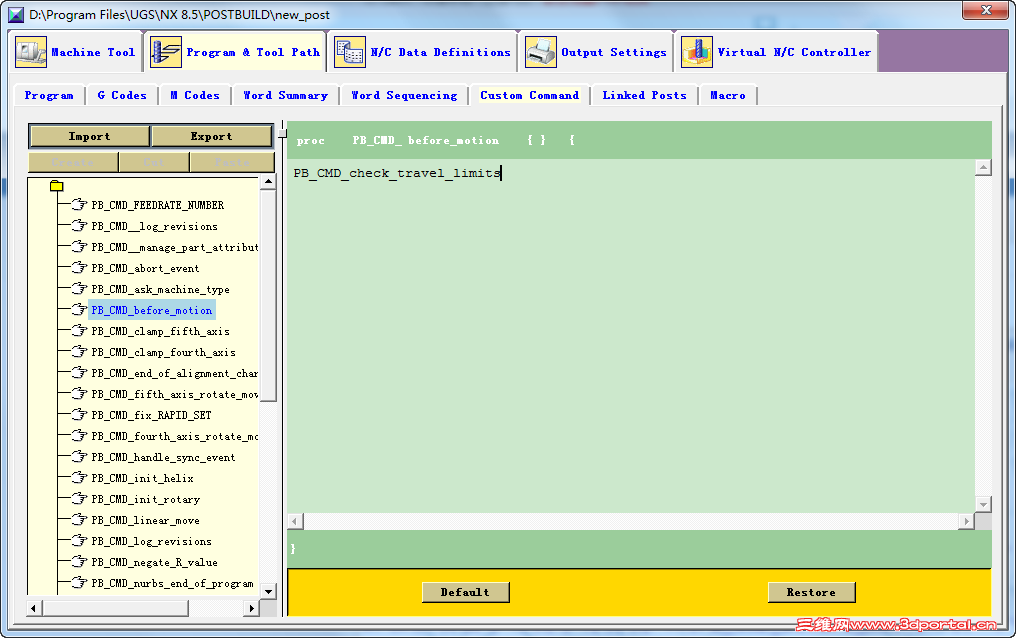
PB_CMD_before_motion自带很多内容,看不懂,没敢删
( Q5 {' G$ c4 n- S! H2 r
% f2 S% e) f) `) r2 f2 \# Output motion type for following motions
/ s8 f( P- H7 ~ global mom_motion_type
5 q( R! o: Y# C$ f$ g& {% w6 M- q switch $mom_motion_type {4 J# R5 @& Z5 o4 e9 ^* a& P
"FIRSTCUT" -% g5 Q L X+ ~/ |* h- O
"DEPARTURE" -- d4 N1 I' J* Q* X$ X
"STEPOVER" -
! ?0 p' F- D- e" \ "CUT" { PB_CMD_output_motion_message}
/ O' y$ _- v0 k- j5 I }
6 Y) ~. B v9 H- ]6 ]7 g0 Z0 v. b3 a' r; M$ p0 b4 H
# Detect variable-axis machining
2 h& w% \, S1 B; ]! p/ ? global mom_tool_axis_type. ~; F) I4 q7 T* A7 m$ i2 J
global mom_operation_type
; J$ L5 P. S$ ~2 T global mom_current_motion7 i9 d) q3 C# w4 W9 v' P) d
global mom_siemens_5axis_mode
5 `; n; u2 S h9 N o0 d global mom_siemens_5axis_output_mode
0 Z& Z3 Q! F; t2 F$ ?* n global mom_siemens_milling_setting/ [* c8 _8 m/ \: }" O5 B' P
global mom_operation_name. o% z2 P/ w& j6 r" ]
global mom_tool_path_type
) g$ `( y. _% T: C% m$ K; z) D
2 j$ L- z6 t- t+ } if { ![info exists mom_tool_axis_type] } {
, N" N4 _1 O% X$ v5 t! I' }0 L set mom_tool_axis_type 0
1 K- Z! U8 j! Q: `: Y }
3 B7 u8 U u9 ~2 h if {![info exists mom_tool_path_type]} {
7 K5 u5 u4 y2 J# r/ q set mom_tool_path_type "undefined"+ }% V/ I) a: X$ b/ D
}
0 `) C! B% T; n6 s; v! O #<lili 2013-06-20> Enhancement for new drilling cycle operation type
5 {3 q& A G3 c* Y( b if { [string match "first_move" $mom_current_motion] || [string match "initial_move" $mom_current_motion] } {' i$ U( L/ O0 x* R
if { ($mom_tool_axis_type >=2 && [string match "Variable-axis *" $mom_operation_type]) ||\
, B) i6 Q. @- B2 T" ~5 z1 E ^ [string match "Sequential Mill Main Operation" $mom_operation_type] || \. X$ O5 l. q# {& d
([string match "variable_axis" $mom_tool_path_type] && ![string match "Variable-axis *" $mom_operation_type] &&\
) g1 K- @( p! j- o' Q |% s. ~7 F [string compare "Hole Making" $mom_operation_type] && [string compare "Point to Point" $mom_operation_type] && \
# ?! P7 p6 ^( z" P# q8 M2 j8 o) [0 T# w [string compare "Cylinder Milling" $mom_operation_type] && [string compare "Thread Milling" $mom_operation_type] && \
6 _; n- m9 G3 g3 z' P' U& H [string compare "Drilling" $mom_operation_type])} {
6 `$ g" l$ S) d: z) ]. k
+ K' l9 f" P# a if {[info exists mom_siemens_milling_setting] && [string compare "Default" $mom_siemens_milling_setting]} {9 b; J) t( H8 c5 C
if {[info exists mom_siemens_5axis_mode] && ![string match "TRAORI*" $mom_siemens_5axis_mode]} {
& L" F; M( w' F/ z. x! |3 { MOM_output_to_listing_device "Warning in $mom_operation_name: Variable-axis operation should work with TRAORI, please check the UDE setting."
" v9 \& n, u4 F. m% S, t }# V( T. r0 E+ s7 }7 F5 K
} else {. t3 r+ P" U- n5 \
if {[info exists mom_siemens_5axis_mode] && [string match $mom_siemens_5axis_mode "TRAORI2"]} {
8 |, G/ R3 U$ M3 Q7 I5 u/ l9 | set mom_siemens_5axis_mode "TRAORI2"1 S& X# n6 k6 ^8 G' I" E2 M% V
} else {* B" p- n3 n6 G$ H
set mom_siemens_5axis_mode "TRAORI", M, h, U4 U- p+ N1 \& B8 v
}
' |6 y* J( p, f set mom_siemens_5axis_output_mode 1 \/ k% c) d% r5 d% v
}
z% N) X+ n* g+ r }
+ O6 i* a9 g% R- b) I) F4 g" b' p }# Z" o4 `" b: [, @% K
+ l4 ^9 X- l3 z0 W* Z0 n # Output cutcom mode and caculate positions
# R r* a7 w) Q if { [llength [info commands PB_CMD_calculate_cutcom]] } {4 }; X. i$ i7 k
PB_CMD_calculate_cutcom
9 @ Z, E3 O, O9 L' X }
( w2 p9 o9 w" N8 J X7 E' W, y
& k+ s; O1 x, [8 c) J # Output tool tip position independent with machinme kinematics(TRAORI).
+ X5 s/ a# q: B' w7 K if { [llength [info commands PB_CMD_output_5axis]] } {* F! p# p% o2 l z9 ?7 r0 S
# PB_CMD_output_5axis. ^ M, s$ x* \5 H- y) D
} |
|









 :):):)
 发表于 2017-3-27 15:44:55