|
|
马上注册,结识高手,享用更多资源,轻松玩转三维网社区。
您需要 登录 才可以下载或查看,没有帐号?注册

x
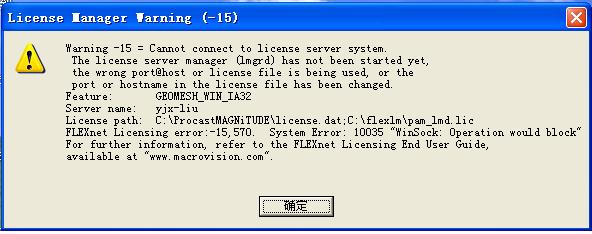
昨天在FTP上下了geomesh,经安装打开时出现“如 图片1”的对话框。8 L+ Z" i2 H, [" |( J+ `5 J8 D" P
提示安装6 l' Y& K+ N' H7 L' U8 v1 v6 U
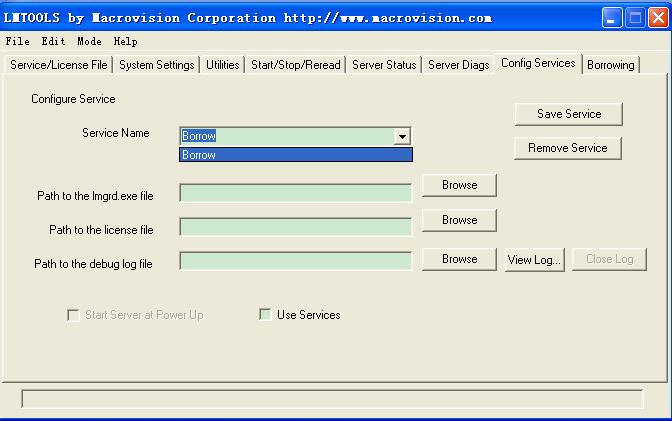
4) Run FlexLM License Manager ( C:\flexlm\lmtools.exe) and config a new service8 _; R/ a- { C, o$ J: l* Y
- in "Service/License File" select "Configuration using Services"
2 k. I9 }- b# j: b5 v: g2 x- in "Config Service" input any name in "Service Name", browse paths to "lmgrd.exe", "pam_lmd.lic" and log-file (by default C:\flexlm\). X+ J1 [. s: w% Y& Y
- select "Use Service" and "Start Server at Power Up"/ I9 L# U J" K/ T1 h
- click "Save Service"" Q' B2 [' X! j- m3 }0 m1 K* l) \
- in "Start/Stop/Reread" click "Start Server"% O2 c" ^# Y- E% F
安装不了,如图片2' d# I0 ~; X- A( Q0 }# u
* l3 t \8 F! c+ [9 S请教!; S" d; L* K5 Y) O; B% }7 m8 S7 T
谢谢! |
|


 [复制链接]






 发表于 2008-4-10 12:42:52
 楼主
楼主 发表于 2008-4-11 06:35:27
